Showing posts with label Research. Show all posts

Sunday, February 27, 2022

The Difference Between FK and IK Controllers

 If you are an animator or someone who is very into rigging, then you have probably heard about FK and IK controllers.  This is just a short write up about the differences between FK and IK controllers with Lucy from the Delivery project as an example.  

Forward Kinematics or FK controllers are often times used when creating expressive animation.  These controllers are very good at capturing realistic movement.  The logic behind these controllers is that the top controllers holds all the controllers underneath it.  It's a parent-child relationship!  Because of the nature of the parent-child relationship they are animated through rotation.  While these are all of the positives about this controller set up, FK is not very good when you need a character or object to rest their weight on something.  You will need to counter animate.  

Autodesk Maya 2022 Gif of Lucy FK Controllers

Inverse Kinematics or IK controllers are used when you need something to independently "stick".  These controllers are interesting because the top controller is independent of the bottom controller.  When you move a controller anything between the two controllers is being solved by the computer.  It is sticky so for example if you put a hand on a table and you try to move the table the hand will go with it if parented.  Because of the nature of how it works, you are animating through translations.  This type of controller does require a more complicated set up and it is more difficult to get realistic animation when you aren't resting weight. 

Autodesk Maya 2022 GIf of Lucy IK Controllers

Rigs can be built with both FK and IK controllers.  Somtimes they may be built with only FK or only IK.  In some cases if you character or object has a specific movement you may even have other set ups such as FK space.   


Monday, January 31, 2022

Jaw Pivot - Good Way To Figure Out Where This Joint Should Be and The Effects You Get

 It's been a while since I have worked on this project.  Sometimes life gets a bit crazy and this is a project I am picking back up. When I was creating my joints for my jaw pivot, I learned something I didn't really think about too much.  I think about anatomy a lot when I work on a character by looking at several real life skeletons and looking at animation.  With the jaw pivot, the whole idea of where it can be placed to get different effects really got me thinking.  

When I placed my joints, I placed it based on realism.   I placed my jaw hinge joint close to the ear and close to where the neck would be connecting to the skull.  It's very similar to a drawing my instructor did in class.

Autodesk Maya 2022 Joint Placement

Drawing from Facial Rigging Class

A really interesting point about the jaw hinge that I learned is that they don't always just rotate.  They will also translate a little bit when it gets to a certain point.  For more realistic rigs, you can leave rotation and translation turned on so that it is easier for the animators.  Animators can adapt it a little bit.  I also learned that with realistic facial rigs you can create the jaw open with shapes and the motion would be build in.  

Cartoon rigs are different from realistic rigs because the design of the character will become a consideration on how you want them to move.  They may have a very long nose like Goofy or very long fingers.  This same idea applies to the jaw.  Where you place your jaw hinge will give you a different effect for how the jaw moves.  An example I looked at was if you wanted your jaw to move almost vertically, your pivot would have to very far away so that when you rotate it would move more vertical.  

Example of Jaw Hinge for Vertical Movement

Another example that was looked at is if the character was designed to have a very sharp rotation.  The pivot point would actually move further way from the ear and closer to the jaw.

Example of Jaw Hinge for Sharp Rotation

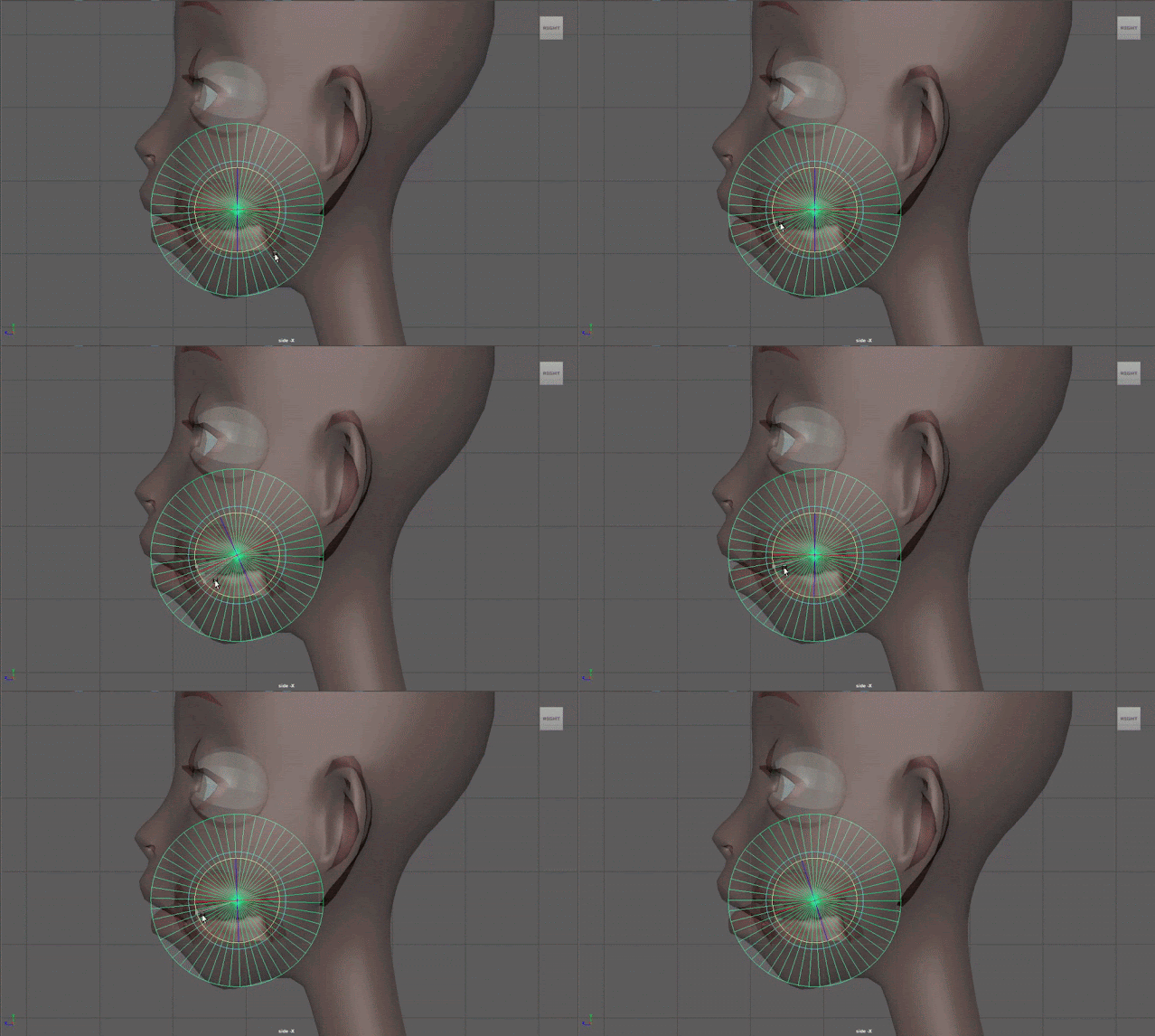
A cool trick that I tried for visualizing how the pivot is going to act is to bring a cylinder into the scene and then rotate it 90 so that it's on it's side.  You would be looking at the vertices that create the center of the cylinder.  Then bringing it up into the head geometry and turning on xray.  You can use the center, scale and place it where you think you want to put your jaw hinge joint.  Tip:  The more subdivisions you have the smoother it looks.  Then rotate the cylinder, this will give you an idea as to what kind of effect you will get. 

Gif Example of Sharp Rotation

While I haven't had the experience of creating a rig with a vertical movement or a sharp rotation, I found this to be very interesting and hope I can create a rig with these effects in the future!

Sunday, October 24, 2021

Facial Action Coding Systems and Model Typology

From my facial rigging class, one of the concepts I learned is that it's very hard for humans to isolate the muscles in the face because of how they are so inner connected.  When you move one part of the face, other muscles on the face move and react too.

AU - Fundamental actions of individual Muscles or groups of muscles.

AU - Brows: These are just very basic

  • Inner Brow Raiser
  • Outer Brow Raiser
  • Brow Lowerer - This is the only action that brows do apart from inner and outer
AU - Lips
  • Upper Lip Raiser - Raises the upper lip corners
  • Lower Lip Depressor - lowers to lower lip corners
  • Nose Wrinkler - compliments upper lip raiser expressions.. It moves the corner of the nose and creates a deepening in the nasal fold.  
AU - Mouth
  • Lip Corner Puller - Basically is a smile
  • Lip Corner Depressor - Frown or Sad
  • Lip Tightener
  • Lip Stretcher

Facial Rigs are controlled through attributes or controllers.  The danger with attributes is that the animator will have to know what to reduce or increase to get the facial expressions they are looking for.  Controllers do a better job at fixing this problem where animators need to adjust many different attributes.  Having controllers may give you more control to follow the action units.  Both attributes and controls give you the action units you need.  


AU - Cheeks
  • Cheek Puff - Inflates
  • Cheek Suck 

Awesome Web Reference: Imotions


 Typology:

Typology on a model is key to get good results on both the shapes you create and the deformation.

Before you start rigging, you should always check the typology.  If you are modeling it or receiving it, it's always a good idea to check it. 

Things to look for in good typology:
  • Circular loops in the mouth and eyes
  • same number of edges on upper and lower lips and eyelids
  • Quads
    • Proportional and even
    • Good flow
    • Triangles if needed out of the way
    • star edges out of the way as much as you can
  • Vertical edges on eyebrows
  • Muzzle loop
  • Nasolabial Fold Line
Example from Google of Facial Typology


Good website for typology reference: Hippydrome

Sunday, October 17, 2021

The Facial Expressions and The Types of Facial Rigs

 For the past three years, I have been fascinated by facial rigging.  I absolutely love rigging character's body and continue to learn about rigging props.  I'm taking a facial rigging class that I'm super excited to take at CGMA with Jose Antonio Martin Martin.  In the first week I learned some really interesting points about facial expressions that I never thought about and I wanted to share some of my findings. 

The very first point that I learned about was the fact the facial expressions are the same everywhere.  It doesn't matter your nationality, culture, race, gender, or age as a joyful smile shows happiness to anyone anywhere.    

Smiling Faces From Google

While people have many different expressions, there are the big 6 main expressions which are sadness, anger, joy, fear, disgust, and surprise.  The many other expressions fall into different variants, may be called differently, or is a combination of two main expressions.  
This point really surprised me but it was Darwin who suggested that facial expressions are a universal language because they mean the same everywhere.  Facial expressions are also innate rather than a learned behavior.  This is very different than hand gestures because in different places, hand gestures don't mean the same thing.  Facial expressions can also be broken down into Action Units in the FACS (Face Action Coding System).

I also learned about different types of facial rigs.  The first distinction between the facial rigs is if they are shape based or deformer/joint based, or a combination of all.  
Some facial rigs are stylized and they are created with shapes.  These rigs use FACS plus extra shapes and lots of tweakers and deformers.  Rigs that are stylized are cartoon rigs.  An example would be Ratatouille by Pixar.

Ratatouille by Pixar, Image found on Google

Facial rigs can also be realistic.  These rigs have a lot of shapes and a complete set of FACS.  They also have many combinations and extra shapes and they often have extra rigging set ups but not as many deformers as cartoon rigs.  A good example of this is Thanatos from Avengers Infinity War.

Thanatos from Avengers Infinity War, Image found on Google


The last type of facial rigs are gaming rigs and they tend to be joint based with a few blend-shape correctives.  Because gaming engines have restrictions, facial rigs are created this way.  The engines are becoming more powerful with fewer restrictions so these types of rigs are constantly evolving.  My very first facial rig I did while at FIEA was a joint based rig I created for Hades.

Last of Us Facial Rig Example, Image found on Google

Scaling Your Controllers when they are Connected

 Sometimes when you are working on a rig, you may need to go back and adjust your controllers size a little bit.  This is possible without b...